Update 5/23/18:
I published this article several years ago. No doubt many of the links and references are now outdated. Just keeping it here to preserve the history of some blog entries.
Short circuits, blue smoke, and a collection of DIY projects, experiments, tips and tricks in electronics.
Showing posts with label development. Show all posts
Wednesday, May 23, 2018
Sunday, July 22, 2012
The Raspberry Pi - Finally
On February 29th 2012, I was awake and anxiously waiting for the clock to hit the 6:00AM GMT time mark. After a long wait the day to be able to place an order for the famous and over hyped Raspberry Pi was arriving, I had already created my account on the RaspberryPi.com store and was happy to soon become the owner of one (or two) of the 10,000 boards that were being manufactured as the first production run for developers.
It is 6:00AM !! Big Surprise, instead of launching the sale directly, the folks from the Raspberry Pi Foundation (RPF) put together a deal with two major electronics distributors based in the UK, Farnell and RS Electronics. And that's not all, the boards are not available yet, they are still in production in China. But I was not a lonely geek trying to find how to place my order, there were a couple of thousand souls trying to do the same, so we DOSsed the distrubutor's websites that were not ready to take the orders, some of their affiliated sites overseas (like Newark) didn't have a part number for it, and there was a lot of confusion about price and shipping costs. This was just the start of a growing list of mishaps by RPF that I'll not cover here.
Finally after several hours trying and thanks to a fellow engineer that tweeted the right part number I was able to place an order for two units with Newark. Given that this was sort of a short run production there was a limitation of one unit, so I expected to have at least one in the next few days or weeks.
Time goes by, boards don't get shipped, alas !!!, the assembly house in China screwed up and populated the boards with the wrong RJ45 connector for the Ethernet interface !! more delays ... Ohhh, do the boards have CE and FCC certification and have been tested for hazardous materials asked the distributors ... huh?, more delays, and mixed with misinformation, confusing messages from RPF, frustrated people being kicked and banned from their Blog and forum (me included), and goes on. But after all the first board arrived by the end of May.
So what is the Raspberry Pi ?
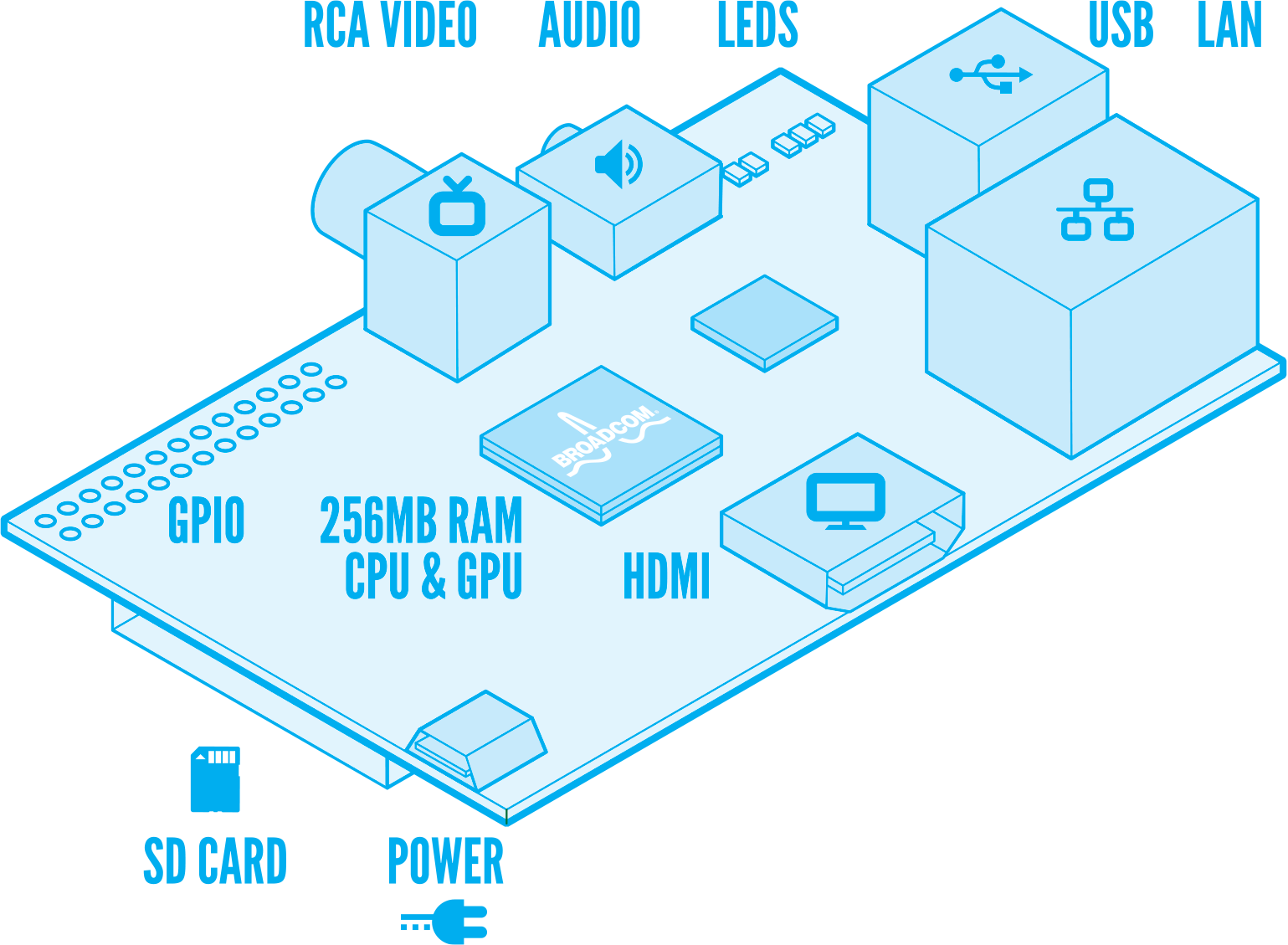
The Raspberry Pi or Rpi, it is a small circuit board, about the size of a credit card with a Graphics Processor Unit with RAM memory on top (called PoP - Package on Package), an Ethernet controller with an integrated two port USB hub and various support components like voltage regulators, etc, to make the board work.
After many of us asking for them RPF made public the full schematics for it.
The GPU is a Broadcom BCM2835 System On Chip (SoC) that contains an ARM11 core running at 700MHz, and a Videocore 4 graphics processing unit, and there is a 256MB SDRAM from Samsung or Hynix.
For mass storage there is a socket on the bottom side of the board that fits a SD Memory Card, composite and HDMI video outputs, a rudimentary PCM stero audio ouput, and for the model B two USB ports and one Ethernet port implemented with SMSC LAN9512 single-chip Ethernet controller and USB 2.0 hub.
The following diagram made by Paul Beech shows what is on the board.
Additional details about the hardware can be found on the eLinux Wiki Rpi Hardware page.
What about software ?
From the get go the Rpi was intended to run a customized version of embedded Linux, or eLinux, there are several distros under work like Debian, Arch Linux ARM, Fedora Remix, QtonPI, and Raspbian the optimized version of Debian for the Rpi.
Disk images for the SD memory card (minimum recommended size is 4GB) of some of these distros are available at the RPF download page.
Take in account that this is still a work in progress, so some of the distros like Raspbian are based on betas like "wheezy" for Debian.
Here is a screen picture of X-windows running on the Rpi with 1920x1080 resolution. One of the windows shows the Scratch programming interface that has been created by MIT as a programming and learning language for young kids.
Where it came from ?
The Rpi is the brain child of a group of scientists from the UK, that were interested to revive some of the spirit of the old personal microcomputers like the BBC Micro, Commodore 64, Sinclair ZX, and many others like that from the 70's & 80's, that provide a very economic and simple computing platform for kids to explore computer science and learn the basics of programming.
One of the alpha prototypes and proof of concept was developed by Broadcom and later modified by Norcott Technologies to reduce the size and number of components to minimize costs. Unfortunately in the process some design decisions were made without the open participation of the community, like using a micro USB connector to feed power from cellphone chargers, what was perceived a cheap solution but is being one of the major problems with the current version.
After RPF made the deal with the electronics distributors, they took over production of the boards that are being assembled at some unknown factory in China at apparently at a rate of 4,000 a day.
How much it costs ? Is it worth to have ?
The RPF keeps promoting it with their site motto "An ARM GNU/Linux box for $25", but this statement is quite misleading.
First is not a box, it does not run Linux but a reduced version of it for embedded systems, if you factor in that you will need a power supply, a SD card, a keyboard, a mouse, and eventually a monitor with the HDMI interface and cable, it is much more than just $25, which by the way is the price for the model A that is not available yet.
If you are geek enough, have time and money to spent on it, even with some of the technical issues that are surfacing, it is still a cool and cheap gadget to experiment with embedded Linux. My interest is to see if it could be used as eLinux based small controller for other systems like home automation, alarm systems, energy management, etc.
If you are looking for a video streamer or game box, like many of the early enthusiasts that showed up on the RPi forum, I'll recommend you better get something like a Roku 2 box that is based on the same GPU and will provide you instant satisfaction.
Also be aware that you may have to wait 5-6 weeks to get yours.
I'll be posting more articles with a more detailed technical reviews, and share some of the projects I'll be working on with the Rpi.
For more information you can visit
Happy Hacking
Jorge
It is 6:00AM !! Big Surprise, instead of launching the sale directly, the folks from the Raspberry Pi Foundation (RPF) put together a deal with two major electronics distributors based in the UK, Farnell and RS Electronics. And that's not all, the boards are not available yet, they are still in production in China. But I was not a lonely geek trying to find how to place my order, there were a couple of thousand souls trying to do the same, so we DOSsed the distrubutor's websites that were not ready to take the orders, some of their affiliated sites overseas (like Newark) didn't have a part number for it, and there was a lot of confusion about price and shipping costs. This was just the start of a growing list of mishaps by RPF that I'll not cover here.
Finally after several hours trying and thanks to a fellow engineer that tweeted the right part number I was able to place an order for two units with Newark. Given that this was sort of a short run production there was a limitation of one unit, so I expected to have at least one in the next few days or weeks.
Time goes by, boards don't get shipped, alas !!!, the assembly house in China screwed up and populated the boards with the wrong RJ45 connector for the Ethernet interface !! more delays ... Ohhh, do the boards have CE and FCC certification and have been tested for hazardous materials asked the distributors ... huh?, more delays, and mixed with misinformation, confusing messages from RPF, frustrated people being kicked and banned from their Blog and forum (me included), and goes on. But after all the first board arrived by the end of May.
So what is the Raspberry Pi ?
The Raspberry Pi or Rpi, it is a small circuit board, about the size of a credit card with a Graphics Processor Unit with RAM memory on top (called PoP - Package on Package), an Ethernet controller with an integrated two port USB hub and various support components like voltage regulators, etc, to make the board work.
After many of us asking for them RPF made public the full schematics for it.
The GPU is a Broadcom BCM2835 System On Chip (SoC) that contains an ARM11 core running at 700MHz, and a Videocore 4 graphics processing unit, and there is a 256MB SDRAM from Samsung or Hynix.
For mass storage there is a socket on the bottom side of the board that fits a SD Memory Card, composite and HDMI video outputs, a rudimentary PCM stero audio ouput, and for the model B two USB ports and one Ethernet port implemented with SMSC LAN9512 single-chip Ethernet controller and USB 2.0 hub.
The following diagram made by Paul Beech shows what is on the board.
Additional details about the hardware can be found on the eLinux Wiki Rpi Hardware page.
What about software ?
From the get go the Rpi was intended to run a customized version of embedded Linux, or eLinux, there are several distros under work like Debian, Arch Linux ARM, Fedora Remix, QtonPI, and Raspbian the optimized version of Debian for the Rpi.
Disk images for the SD memory card (minimum recommended size is 4GB) of some of these distros are available at the RPF download page.
Take in account that this is still a work in progress, so some of the distros like Raspbian are based on betas like "wheezy" for Debian.
Here is a screen picture of X-windows running on the Rpi with 1920x1080 resolution. One of the windows shows the Scratch programming interface that has been created by MIT as a programming and learning language for young kids.
Where it came from ?
The Rpi is the brain child of a group of scientists from the UK, that were interested to revive some of the spirit of the old personal microcomputers like the BBC Micro, Commodore 64, Sinclair ZX, and many others like that from the 70's & 80's, that provide a very economic and simple computing platform for kids to explore computer science and learn the basics of programming.
One of the alpha prototypes and proof of concept was developed by Broadcom and later modified by Norcott Technologies to reduce the size and number of components to minimize costs. Unfortunately in the process some design decisions were made without the open participation of the community, like using a micro USB connector to feed power from cellphone chargers, what was perceived a cheap solution but is being one of the major problems with the current version.
After RPF made the deal with the electronics distributors, they took over production of the boards that are being assembled at some unknown factory in China at apparently at a rate of 4,000 a day.
How much it costs ? Is it worth to have ?
The RPF keeps promoting it with their site motto "An ARM GNU/Linux box for $25", but this statement is quite misleading.
First is not a box, it does not run Linux but a reduced version of it for embedded systems, if you factor in that you will need a power supply, a SD card, a keyboard, a mouse, and eventually a monitor with the HDMI interface and cable, it is much more than just $25, which by the way is the price for the model A that is not available yet.
If you are geek enough, have time and money to spent on it, even with some of the technical issues that are surfacing, it is still a cool and cheap gadget to experiment with embedded Linux. My interest is to see if it could be used as eLinux based small controller for other systems like home automation, alarm systems, energy management, etc.
If you are looking for a video streamer or game box, like many of the early enthusiasts that showed up on the RPi forum, I'll recommend you better get something like a Roku 2 box that is based on the same GPU and will provide you instant satisfaction.
Also be aware that you may have to wait 5-6 weeks to get yours.
I'll be posting more articles with a more detailed technical reviews, and share some of the projects I'll be working on with the Rpi.
For more information you can visit
- Raspberry Pi Official Site and Blog
- Raspberry Pi Official Forum
- eLinux Wiki section for Raspberry Pi
- The indepent RPIForum
- Element14 Community Discussions
Happy Hacking
Jorge
Friday, June 3, 2011
chipKIT PIC32MX based boards by Microchip and Digilent
Well, after some anxious waiting the new chipKIT™ development boards finally arrived this week. I'm obviously talking about the chipKIT™ Uno32™ and the chipKIT™ Max232™ boards produced by Digilent and co-developed with Microchip.
First of all notice that chipKIT™ is a registered Trademark by Microchip Technology, Inc. (they seem to be very cautious to include the ™ everywhere.)
These boards feature Microchip's PIC32MX 32-bit microcontroller family and claim to be somehow "the first 32-bit microcontroller-based platforms that are compatible with existing Arduino™ hardware and software" (more about the compatibility thing later).
The boards are produced by Digilent, Inc., and they share the same high quality and detail I've seen on other development boards produced by them. No need to say that the new chipKIT™ platform has behind it the marketing machinery of Microchip, and that the development of this new platform seems to have been originated within the Academic Exchange group to meet the demand for a 32-bit solution requested by the hobbyist, academia and embedded engineering communities.
(Hey look !! Microchip even produced and uploaded a video on YouTube.)
Update: For some reason the original video has been removed from YouTube.
As you may probably know "Arduino™ is an open-source electronics prototyping platform based on flexible, easy-to-use hardware and software", and until now all Arduino™ hardware has been based on Atmel 8-bit microcontrollers.
Hmmm "open-source", that's sort of new territory for Microchip, and obviously generated some buzz when the first rumors about these boards hit the development community, where Microchip licensing terms for most of the "License Free" stuff they make available for download and use are very well known for not allowing you to share or redistribute any changes or contributions to their stuff, kind of totally opposed to the spirit of the Arduino community.
Ian Lesnet from Dangerous Prototypes had a great initiative to collect questions from the community to be asked during a phone interview with the people involved in the chipKIT™ platform development. Ian was very kind to make the recording of the interview available on-line, you can find the recording and an interesting exchange of comments on this thread of Dangerous Prototype's forum.
OK, how compatible are the new boards with the existing Arduino™ stuff ?.
First of all notice that we are talking about a completely different Microcontroller, that means you need a different compiler and integrate it with the development environment. What Microchip did ? (something they not let you do with their stuff) took the open-source Arduino™ IDE and modified it to include support for the PIC32MX and redistributed it renamed as MPIDE (for Multi Platform IDE) with what seems to be an open-source license.
The key question is if the existing Arduino™ libraries will fully work on the new platform and if Microchip adds new libraries to support the new features introduced by using the PIC32MX will also be open-source and freely modifiable and distributable.
There are some folks already testing how well the existing libraries work and doing some performance testing as related on this article at Hack a Day, and some pin compatibility analysis by the Rugged Circuits folks.
About the hardware, the fine letter says "footprint compatible", and the intention here is to have the same form factor and approximate pinout so you may be able to use many of the already existing Arduino™ shields, but keep in mind the the chipKIT™ boards are 3.3V and there may be some shields that require 5V, remember always to check the schematics and documentation of each particular shield to avoid the unpleasant blue smoke.
Now taking a quick look at the new boards, this is a quick and preliminary first look at them, I'll post more articles as I power them and start doing some developments and tests.
The chipKIT™ Uno32™
Inspired and "footprint compatible" with the Arduino™ UNO. It features a 64-pin PIC32MX320F128H 32-bit Microchip microcontroller with 128KB of internal FLASH program memory and 16KB RAM, instead of a Type-B as the original Arduino™ UNO it has a mini-USB connector for the serial interface to the FTDI USB-Serial converter.
One thing that bugs me being one of the nice features of the PIC32MX family that you can have a nice chunk of program memory, why for one more dollar they didn't populate the Uno32™ with a PIC32MXF340F512H that has 512KB of FLASH and 32KB of RAM? It will probably be the first mod on my board.
The chipKIT™ Max32™
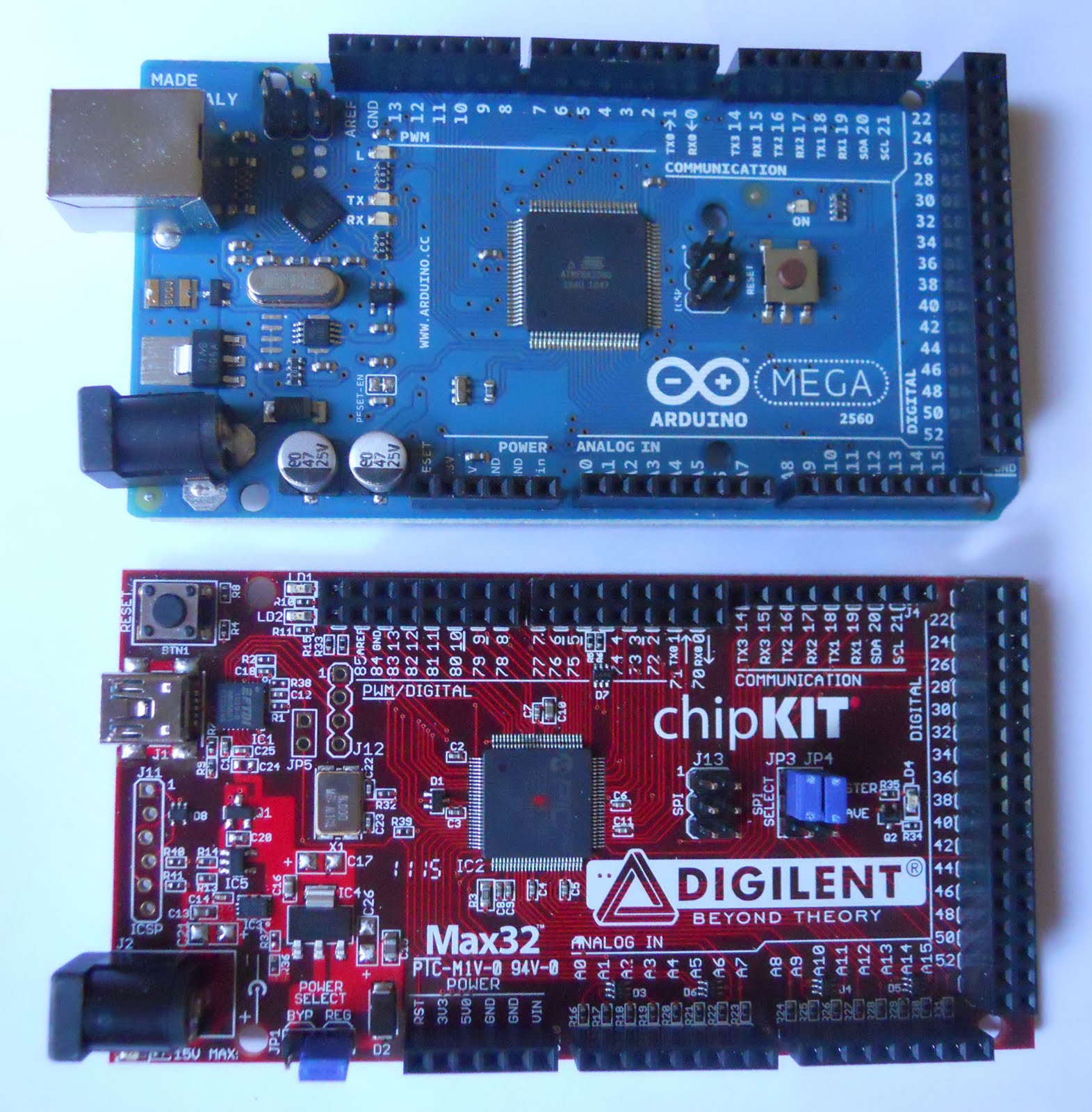
Inspired and "footprint compatible" with the Arduino™ Mega2560. It features a 100-pin PIC32MX795F512L 32-bit Microchip microcontroller with 512KB of internal FLASH program memory and 128KB RAM.
One nice feature of this member of the PIC32MX family is that it includes an 10/100 Ethernet MAC module, it requires and external PHY chip for a 10/100BaseTX but Digilent said to expect an shield that will take advantage of the Ethernet and USB interfaces by July.
Both boards include direct access to the PIC32MX ICSP interface in case you need to program the PIC32MX directly. The boards are preprogrammed with a bootloader and the classic flashing LED demo. In case you wonder why the ICSP header pins are not in line read this tutorial article from SparkFun.
One nice change on the layout of the new boards is the position of the RESET button, as you can see on the pictures if you have a shield installed on top of the Arduino™ boards unless you have a hole on the shield it is almost impossible to hit the RESET button, the new chipKIT™ boards have it in one of the corners where even with a shield on top it makes the button accessible from the side.
I'll start playing with the boards and post additional articles. As Microchip, I took care to include the stinking TM mark on all references which they make explicitly clear that are trademarks of Microchip and just saying that other trademarks are from their respective holders blah blah blah without mentioning that Arduino™ is a registered trademark of the Arduino team.
Hope this incursion of Microchip in this arena brings a change of attitude and helps they learn from this experience and embrace some of the practices of the open-source community.
BTW, even when it is a registered trademark the boards and associated software are not "official" Microchip products so don't expect direct support from Microchip, if you need help visit the chipKIT Forum (how original !! they also registered the chipKIT.cc domain, well it goes in companion with the originality of the packaging too).
Some links to keep handy:
Looking forward to see the first batch of clones :-), hey it is open-source after all !!
Cheers
Jorge
First of all notice that chipKIT™ is a registered Trademark by Microchip Technology, Inc. (they seem to be very cautious to include the ™ everywhere.)
These boards feature Microchip's PIC32MX 32-bit microcontroller family and claim to be somehow "the first 32-bit microcontroller-based platforms that are compatible with existing Arduino™ hardware and software" (more about the compatibility thing later).
The boards are produced by Digilent, Inc., and they share the same high quality and detail I've seen on other development boards produced by them. No need to say that the new chipKIT™ platform has behind it the marketing machinery of Microchip, and that the development of this new platform seems to have been originated within the Academic Exchange group to meet the demand for a 32-bit solution requested by the hobbyist, academia and embedded engineering communities.
(Hey look !! Microchip even produced and uploaded a video on YouTube.)
Update: For some reason the original video has been removed from YouTube.
As you may probably know "Arduino™ is an open-source electronics prototyping platform based on flexible, easy-to-use hardware and software", and until now all Arduino™ hardware has been based on Atmel 8-bit microcontrollers.
Hmmm "open-source", that's sort of new territory for Microchip, and obviously generated some buzz when the first rumors about these boards hit the development community, where Microchip licensing terms for most of the "License Free" stuff they make available for download and use are very well known for not allowing you to share or redistribute any changes or contributions to their stuff, kind of totally opposed to the spirit of the Arduino community.
Ian Lesnet from Dangerous Prototypes had a great initiative to collect questions from the community to be asked during a phone interview with the people involved in the chipKIT™ platform development. Ian was very kind to make the recording of the interview available on-line, you can find the recording and an interesting exchange of comments on this thread of Dangerous Prototype's forum.
OK, how compatible are the new boards with the existing Arduino™ stuff ?.
First of all notice that we are talking about a completely different Microcontroller, that means you need a different compiler and integrate it with the development environment. What Microchip did ? (something they not let you do with their stuff) took the open-source Arduino™ IDE and modified it to include support for the PIC32MX and redistributed it renamed as MPIDE (for Multi Platform IDE) with what seems to be an open-source license.
The key question is if the existing Arduino™ libraries will fully work on the new platform and if Microchip adds new libraries to support the new features introduced by using the PIC32MX will also be open-source and freely modifiable and distributable.
There are some folks already testing how well the existing libraries work and doing some performance testing as related on this article at Hack a Day, and some pin compatibility analysis by the Rugged Circuits folks.
About the hardware, the fine letter says "footprint compatible", and the intention here is to have the same form factor and approximate pinout so you may be able to use many of the already existing Arduino™ shields, but keep in mind the the chipKIT™ boards are 3.3V and there may be some shields that require 5V, remember always to check the schematics and documentation of each particular shield to avoid the unpleasant blue smoke.
Now taking a quick look at the new boards, this is a quick and preliminary first look at them, I'll post more articles as I power them and start doing some developments and tests.
The chipKIT™ Uno32™
Inspired and "footprint compatible" with the Arduino™ UNO. It features a 64-pin PIC32MX320F128H 32-bit Microchip microcontroller with 128KB of internal FLASH program memory and 16KB RAM, instead of a Type-B as the original Arduino™ UNO it has a mini-USB connector for the serial interface to the FTDI USB-Serial converter.
One thing that bugs me being one of the nice features of the PIC32MX family that you can have a nice chunk of program memory, why for one more dollar they didn't populate the Uno32™ with a PIC32MXF340F512H that has 512KB of FLASH and 32KB of RAM? It will probably be the first mod on my board.
The chipKIT™ Max32™
Inspired and "footprint compatible" with the Arduino™ Mega2560. It features a 100-pin PIC32MX795F512L 32-bit Microchip microcontroller with 512KB of internal FLASH program memory and 128KB RAM.
One nice feature of this member of the PIC32MX family is that it includes an 10/100 Ethernet MAC module, it requires and external PHY chip for a 10/100BaseTX but Digilent said to expect an shield that will take advantage of the Ethernet and USB interfaces by July.
Both boards include direct access to the PIC32MX ICSP interface in case you need to program the PIC32MX directly. The boards are preprogrammed with a bootloader and the classic flashing LED demo. In case you wonder why the ICSP header pins are not in line read this tutorial article from SparkFun.
One nice change on the layout of the new boards is the position of the RESET button, as you can see on the pictures if you have a shield installed on top of the Arduino™ boards unless you have a hole on the shield it is almost impossible to hit the RESET button, the new chipKIT™ boards have it in one of the corners where even with a shield on top it makes the button accessible from the side.
I'll start playing with the boards and post additional articles. As Microchip, I took care to include the stinking TM mark on all references which they make explicitly clear that are trademarks of Microchip and just saying that other trademarks are from their respective holders blah blah blah without mentioning that Arduino™ is a registered trademark of the Arduino team.
Hope this incursion of Microchip in this arena brings a change of attitude and helps they learn from this experience and embrace some of the practices of the open-source community.
BTW, even when it is a registered trademark the boards and associated software are not "official" Microchip products so don't expect direct support from Microchip, if you need help visit the chipKIT Forum (how original !! they also registered the chipKIT.cc domain, well it goes in companion with the originality of the packaging too).
Some links to keep handy:
- chipKIT Forum
- Microchip official chipKIT page
- Digilent Product pages
- MPIDE and other software download page
Looking forward to see the first batch of clones :-), hey it is open-source after all !!
Cheers
Jorge
Subscribe to:
Posts (Atom)


